


Sub Terra is the side project I've been working on solo for the better part of a year. What started as an experiment to learn Unreal Engine is now an official first person psychological horror game.
This page chronicles the steps I took to get to this point, highlighting the primary obstacles and problems I faced.
The Backrooms
Going into 2024 the "Backrooms" trend was hitting it's peak. Characterized by an late 90s to early 2000s aesthetic, labyrinth-like maps and eerie, liminal spaces, The Backrooms crosses with many horror sub-genres. Some of these include psychological horror, analog horror, and found footage.
Around September of 2024, I learned about Unreal Engine 5, and was eager to test out the functionalities of the engine. Among these functionalities was easy tools to create photo-realistic games. Having been a fan of the Backrooms aesthetic for a few years, I took this chance to create something backrooms related.
Training Grounds
When I was 11 years old, I begged my parents to buy me Game Maker Studio (GMS) on Steam. GMS was a simple 2D game engine with a built-in pixel-art creator/animator and a straight-forward drag & drop system. For the next 3 years I spent hours of each day making little platformer games and trying to learn GML, a coding language similar to javascript. As expected, I didn't understand much and gave up making larger games after a few years. The itch to create a game of my own never died down though, and 12 years later I finally have something that would make 11 year old me proud.
Sub Terra started like a lot of games, as a test to learn a new engine. Before I could make anything photo-realistic in the editor, I had to have an idea of what I wanted to make. The Backrooms was an easy target, but I had grown tired of the same trends used in each backrooms rendition. I wanted to create something that strayed away from the tired, endless maze of beige carpet and florescent lights.
For a little inspiration, I took a look at the "Official Backrooms Wiki", a Fandom page where users can submit fictional "levels" that exist in the Backrooms universe. I came across the page for Level 2 of the Backrooms.
Source: Level 0: "Tutorial Level" - Backrooms Wiki | Fandom


Source: Level 2: "Pipe Dreams" | Backrooms Wiki | Fandom
Pipe Dreams
"Level 2 is a vast network of interconnected utility tunnels, maintenance shafts, and rusting pipes." (Backrooms Wiki, Level 2)
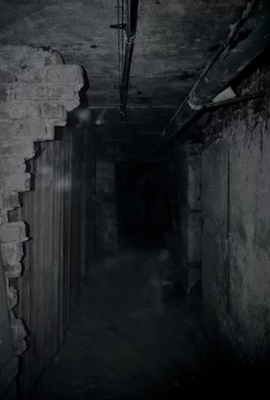
The "Pipe Dreams" aesthetic was just what I was looking for. A healthy balance of a realistic setting and a backrooms level. I refrained from looking too deep into the lore users created for this level since I wanted to keep the Backrooms lore relation to a minimum. Taking the maintenance tunnel idea, I found ample source material to work off of. While most maintenance tunnels were unkempt and overly creepy, one image I found really resonated with me.
Something about the state of the tunnel in this image is so alluring. It's well maintained enough to not be creepy, but the chipping walls and claustrophobic pipes gave me a huge flood of inspiration which I wanted to start on right away.

The First Tunnel
Being completely new to Unreal Engine 5.4, I figured a good way to teach myself the program would be to take an image and recreate it in-engine. Making heavy use of Quixel's free material and mesh assets, I worked on and off beside numerous YouTube tutorials for the next few days. After dealing with the usual problems of learning a new program (I could rant about the inconsistency of Unreal Engine for hours, but this video sums it up better than I ever could), I had a recreated version of the Pipe Dreams tunnel.
This was a huge moment for me. I had accomplished what I set out to do, and more importantly, I was inspired to make more. I quickly created a moodboard on Figma and started brainstorming.

A Flood of Ideas
Immediately after creating the tunnel, I wanted to make it playable. Once again turning to the wide world of YouTube I spent the next few days pulling my hair out learning how Unreal Engine handles Actors/Characters/Pawns/Controllers among other confusing aspects. Soon enough I had a working game that allowed the player to walk up and down the tunnel.
Now that I had this basic functionality up, I dove deeper. Like any horror game, I needed a scary story, a entity to chase you, and a problem to solve. At this point, I had no intentions of releasing this game and was simply making it as a side project, so I took the easy route and followed some cliche horror game tropes. The player found themselves underground being chased by a monster and had to activate five power switches in order to escape (very unique, I know). But this was more than enough to keep me busy. I spent the next month learning hundreds of new ideas in order to create these aspects of the game.
Extra Rooms
I started by expanding the tunnel system, creating 90° turns, 45° turns, and T-shaped/4-way intersections to use in a maze. While I was happy with the result, I thought it felt empty. This led to me designing and filling five separate side rooms to scatter around the maze.
Around this time I realized I would need custom models for the things that Quixel didn't have for free. I installed Blender and followed a few tutorials. After a few hours of fiddling with Adobe Substance Painter and Unreal's particle system Niagara, I had a functioning lever.
As basic as it was, creating this lever and programming the counter gave me a huge boost of confidence. So I continued to expand, next up, a top floor.

(1/5)

(2/5)

(5/5)
(1/5)